
The LingHang theme demo site uses the B2B Product Management Display Plugin to manage products. To add products or product categories to the top navigation menu of the site, follow these steps:
1. Install and activate the B2B Product Management Plugin;
2. Create product categories and add products in the product management backend;
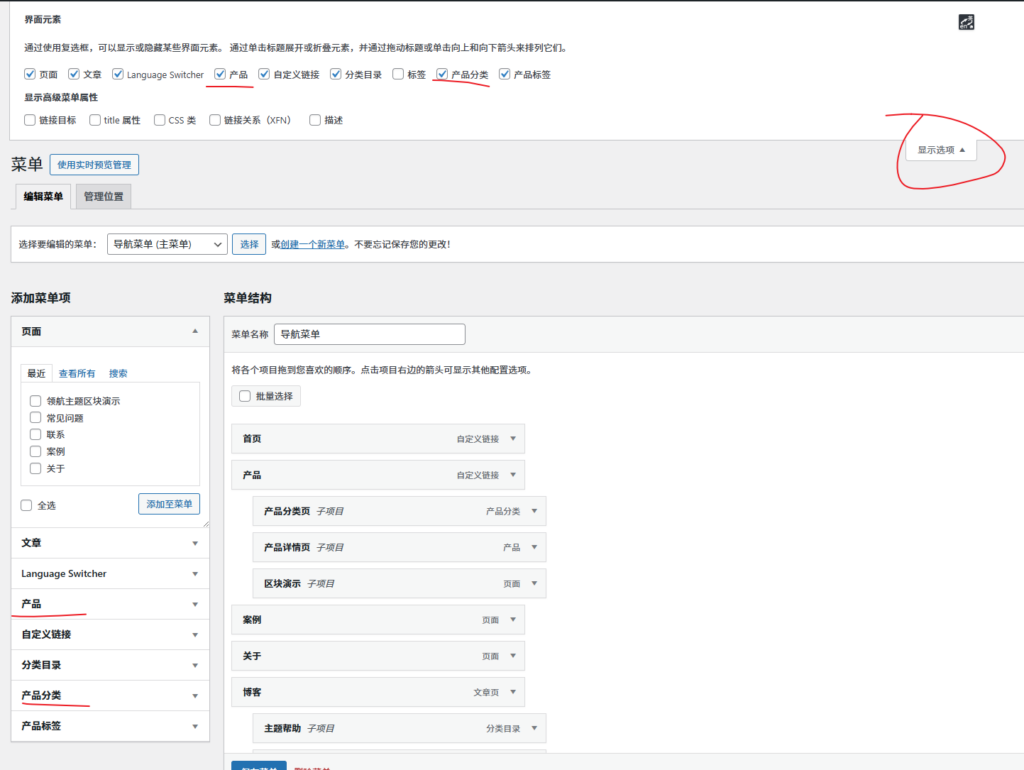
3. In the site backend, go to Appearance → Menus, and select the menu with the display location set to „Main Menu“.
4. Display options in the upper right corner, check Products and Product Categories;
5. On the left, check the content to be added to the menu, then save the menu.
Further Reading:LingHang Theme Mega Menu Tutorial — Making Industrial/Manufacturing Website Navigation More Efficient – LingHang WordPress Business Theme