
FAQ
Questions You Might Have Before Purchasing
This is a new theme. Will you abandon it after I buy it?
Rest assured, we will never abandon it. Our technical blog „Naibabiji“ started on April 13, 2019, and has always focused on providing WordPress website building tutorials and services.
Without user cases, how can I know if it's good?
The official website you are browsing now is the best case. You can personally experience the loading speed and check the module effects. You can also watch our operation demo videos.
Does the theme support multiple languages?
Yes, just install a multilingual plugin yourself.
Can I really get started in 3 minutes? I have no technical background.
Yes, we specifically designed it for non-technical users:
- All operations are click-and-fill, no coding required
- Provides usage tutorials for each module
- 1-on-1 guidance via WeChat, ask questions anytime
Technical support is only 6 months. What about after that?
One-time purchase, lifetime use. After the support period expires, you can continue to use and update the theme, but we no longer guarantee responses to your questions.
Can I use it on multiple websites?
Each license is bound to one domain name and supports self-service domain name change up to 3 times.
Will the theme be continuously updated?
During the feature improvement phase, we will continuously optimize and update based on user feedback; after version stabilization, we will provide long-term maintenance, promptly fix security vulnerabilities, and adapt to the latest WordPress version. This new version of the LingHang theme is developed based on the new API of WordPress 7.0 — since the official version will gradually deprecate the old API in version 7.1, we have completed this architecture upgrade.
Is the LingHang theme suitable for SEO optimization? How is it different from Astra?
Both the LingHang theme and the Astra theme areSEO-friendly, high-performancequality choices. The core difference lies inpositioning and use cases:
- LingHang = Ideal for Vertical Enterprises: Focus on B2B, streamlined and efficient, cost-controllable, fast customer acquisition
- Astra = Versatile All-Rounder: Adapts to all scenarios, highly customizable, rich templates, suitable for design-driven needs
Whichever you choose, as long as you focus onOriginal content + Basic SEO + Continuous operation, you can achieve ideal rankings on Google. The key is toMatch your business needs with technical capabilities, rather than blindly falling into the misconception that „customization = better“.
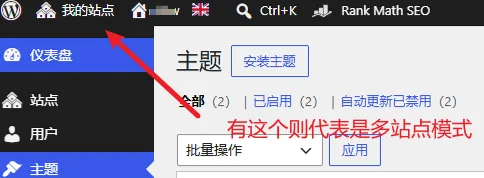
Does the LingHang theme support multisite mode?
The LingHang theme does not support multisite mode.
What content can I modify?
Did you think buying the LingHang theme means it will look exactly like the demo site?
Can I modify the header myself?
The LingHang theme currently supports multiple header layouts, which you can switch between. The theme itself does not support custom header design, but you can achieve customization with third-party plugins. (I don't think your design will be better than our theme's effect.)
Can I modify the website colors?
Yes, the LingHang theme includes a dedicated color settings panel and also supports settings for rounded corners, shadows, and page width.
Can I modify the footer myself?
You can modify the introduction content, link menus, and switch between different footer layouts in the footer, but custom design is not supported.
Does the page layout have to be the same as the demo site?
No, you can design it yourself. We have over 40+ default block templates that you can insert with one click and combine, and you can also modify and adjust the templates.