LingHang Theme SEO Optimization Tutorial: A Ranking Improvement Guide from Beginner to Expert
quhenet7 January, 2026
LingHang is a professionalWordPress Enterprise Theme, designed specifically for business owners who are not very tech-savvy. During user consultations, we often get asked, „Can the LingHang theme do SEO?“ and „Do I need to do SEO optimization myself with the LingHang theme?“ We believe that friends asking these questions are new to SEO and WordPress, so we specially wrote this tutorial titled „LingHang Theme SEO Optimization Tutorial".
Before SEO Launch – Core Preparation and Basic Settings
Core Preparation
Before performing SEO optimization, we need to have a complete WordPress website. To build a WordPress website, you need the following:
Domain Name
Server
WordPress Enterprise Theme
1. Domain Name
A domain name is what we call a web address. For example, the URL of the LingHang Enterprise Theme is https:\/\/linghang.quhenet.com\/, which is a subdomain, and the main domain is quhenet.com.
This domain name needs to be registered and purchased from a domain sales website. For domain registration and purchase, you can refer to Naibabiji'sDomain Name Special Article。
2. Server
Servers are divided into domestic servers and foreign servers. If you plan to do foreign trade, it is recommended to purchase a foreign server, such asSiteGroundorHostinger, which are suitable for beginners.
3. WordPress Enterprise Theme
The WordPress ecosystem is very rich, so there are many enterprise themes to choose from. If you are technically skilled, you can consider lightweight multi-functional themes like Astra or Blocksy.
If you are a beginner user, we recommend you directly choose theLingHang Theme, which is the theme currently used on this site. It is beginner-friendly, meets SEO optimization standards, and is faster than enterprise themes you might tinker with yourself.
Considering that this article mainly introduces how to use the LingHang theme for SEO optimization tutorials, we will skip the introduction to the early WordPress website setup. If you have any questions, you can refer to Naibabiji'sWordPress TutorialAn article.
Basic Settings
The following content is based on operations after you have successfully set up a WordPress website.
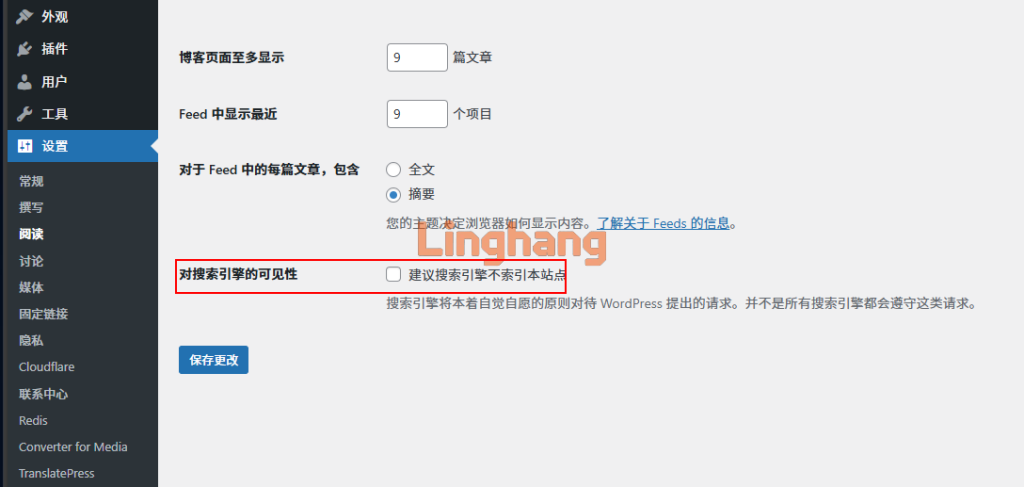
1. Required: Block Search Engine Indexing
Before your website is ready, be sure to enable the option that advises search engines not to index the site, or install acoming soon pluginto prevent search engine crawling.
Why do this?
For new websites, Google's crawling speed is quite fast. Usually, once it discovers your URL, it will add your site to its index within a few days. However, for beginners, it may take months to complete the website, and the data from the first few days is often just template demo data. Google crawling this data is not beneficial for your site's SEO optimization. Additionally, Google's subsequent updates to your site's content will be slower compared to the first crawl. Therefore, we should not waste Google's initial crawl opportunity. Block crawling at the beginning, and then allow crawling after the site is complete for better results.
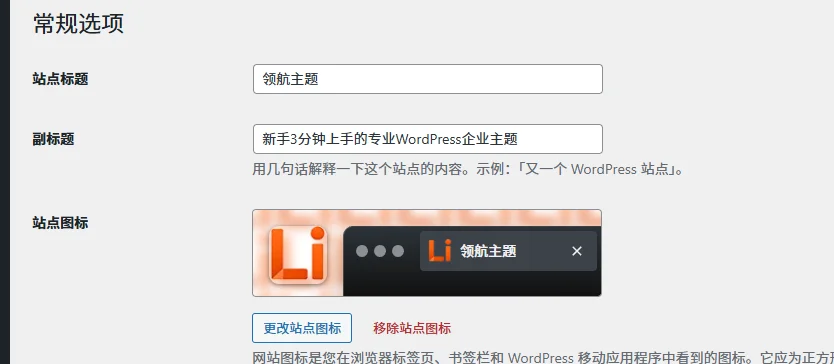
2. Set Site Title and Tagline
Site Title: Usually your website name or company name. It is not recommended to directly use a primary keyword, such as „WordPress Enterprise Theme“.
Tagline: Usually a description containing your website„s primary keywords. For example, our tagline includes the keyword “WordPress Enterprise Theme„.
Keyword Research
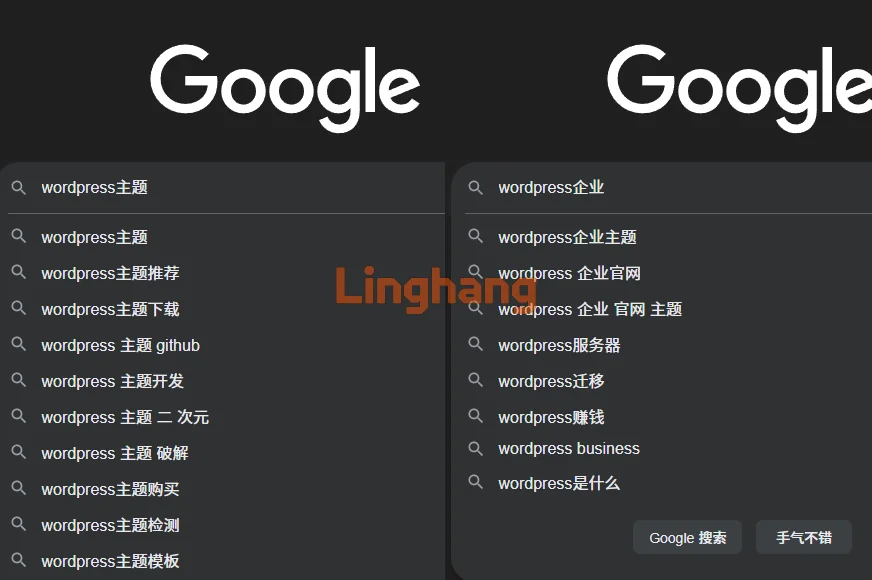
If you have searched for SEO optimization tutorials online, you will find many articles teaching you how to use tools to research keywords, long-tail keywords, keyword competition difficulty, etc. As a beginner outside of SEO, we suggest you not make it too complicated. Simply use Google Search to find your keywords.
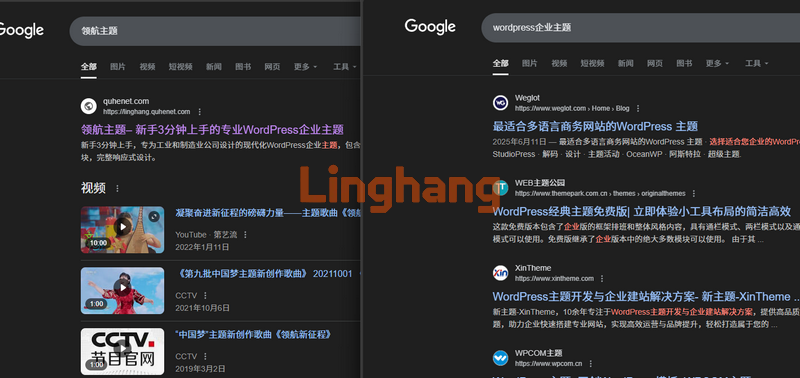
For example, if we enter „WordPress Theme“ and „WordPress Enterprise“, we can see many suggested search terms in the dropdown. These are keywords with a certain search volume. Then, by looking at the quality and quantity of websites that appear in the search results for these keywords, you can gauge the difficulty level. Choose a keyword that you think is suitable as your website„s primary keyword.
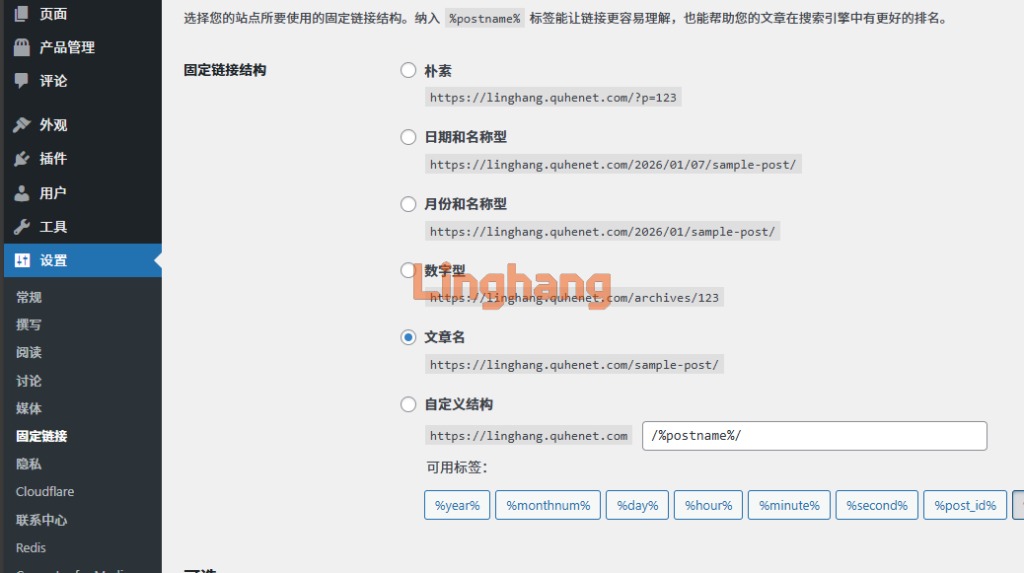
3. Set Permalinks
Generally, it is recommended to choose the "Post name" format. If your website is in Chinese, you can choose a numeric permalink structure.
Once you have chosen a permalink structure and the website is live, do not easily modify the permalink structure.
4. Install an SEO Plugin
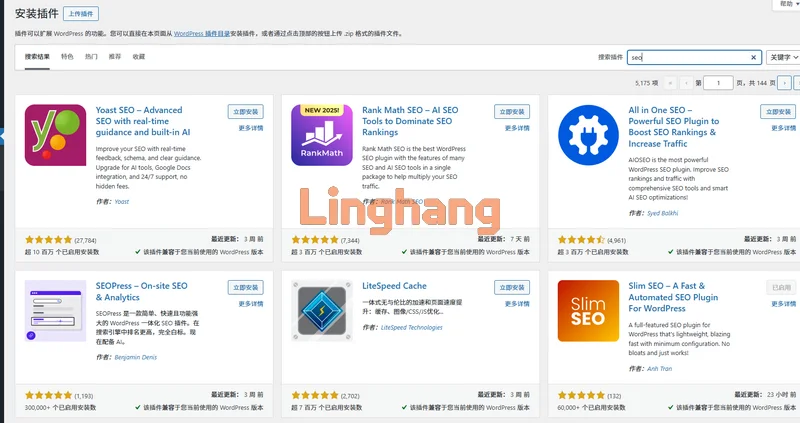
WordPress has many SEO plugins. You can search for "SEO" in the Plugins section of your WordPress admin dashboard. Options like Yoast SEO, Rank Math, All in One SEO, etc., are all usable. Choose an SEO plugin that you prefer and install it.
Important: Install only one SEO plugin. Do not install multiple SEO plugins.
The LingHang theme official website uses the Slim SEO plugin because it is simple and has all the necessary SEO features. The functions of all SEO plugins are essentially similar. Do not blindly trust paid SEO plugins or those with very complex features. More features mean more code, which can also affect website loading speed.
Content is King – High-quality content is the core, SEO techniques are the method
Whether doing SEO or GEO, you must understand that theircore is that users express their needs, and then search engines or AI return answers that can solve those needs.。
What we need to do is provide that „answer“.
Imagine someone searches for "WordPress Enterprise Theme", but our website introduces a blog theme. The search engine or AI shows your site to the user for the first time, but the user is not satisfied. Will they show your site again next time? Definitely not.
Therefore, only when the answer is correct should you then consider how to use SEO techniques to improve the ranking of that „answer“.
SEO Optimization in the Post Editor
1. Title and Description
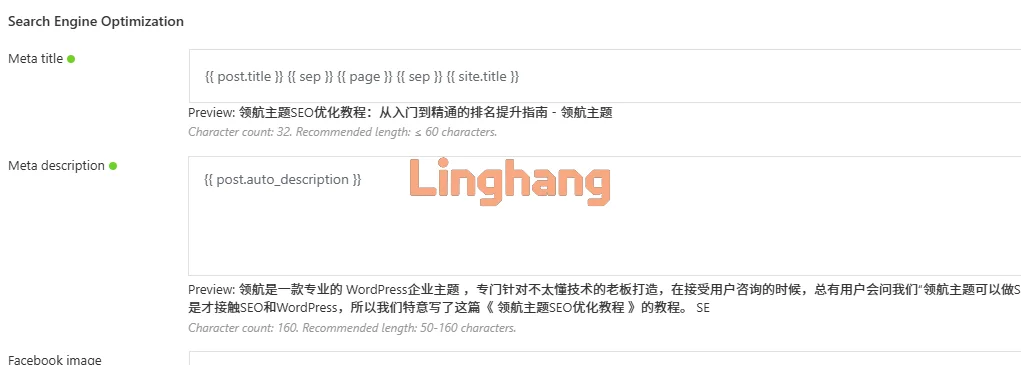
The title should include the optimized keywords for this article. For example, this article titled "LingHang Theme SEO Optimization Tutorial„ includes the keyword “SEO optimization„. If this article were not primarily written for users who have purchased the LingHang WordPress business theme, we could add more precise and higher-search-volume keywords like “WordPress SEO optimization„ or “WordPress SEO tutorial„ to the title.
Description: When you install an SEO plugin, it will automatically generate a description from the beginning of your article by default. You can also write the description manually within the SEO plugin.
When Google displays search results, it automatically generates a description that matches the user's search intent based on your article content. The description you fill in here may not be displayed exactly as you intended in the search results.
2. Article Slug
This refers to the article URL. When you set the permalink structure to use the post name format, the default article slug will be the same as your article title. However, overly long URLs are not conducive to sharing, so we can manually shorten the slug. For example, the slug for this article has been changed to "seo". Users only need to visit https://linghang.quhenet.com/seo/ to view this article. In the future, when users ask about LingHang theme SEO issues, I can conveniently send them this URL. This also improves user experience. (According to Western habits, changing this article's slug to "seo-guide" would be more appropriate.)
Core Techniques for On-Page Content Optimization
On-page optimization mainly focuses on the following aspects:
Use of Title Tags
Image Optimization
Internal Link Building
Use of Title TagsIt is simple: organize your article content in a hierarchical layout. Typically, the website title uses an H1 tag. The LingHang theme has already set the title to default to an H1 tag, so when writing articles, you can start naming headings from H2 tags.
A simple technique for using tags: Title H1 (default, no need to worry), major headings H2, subheadings H3, and smaller H4, H5 can be used as needed.
Image optimization mainly involves image size and ALT description tags.Choose an appropriate image size based on your website's actual needs. For example, an icon image on the homepage only needs to be 300 pixels wide; there is no need to upload a 3000-pixel image. Then, install an image optimization plugin to compress or convert image formats.
If you have product images, especially in industries like jewelry and watches, try to keep product images high-definition and fill in ALT tags. This can often help you achieve good rankings and traffic from Google Image Search.
Internal linking involves inserting links to other pages on your website at appropriate points during article writing. For example, when we say "LingHang Theme is an excellent and beginner-friendly WordPress Enterprise Theme„. In this sentence, we can insert a link to the LingHang theme official website for “LingHang theme„ or “WordPress business theme„. At the time of publishing this article, our website already ranks first on Google and Bing for the search term “LingHang theme„, so we chose to add a link to the LingHang homepage for “WordPress business theme„, effectively creating an internal link from “WordPress business theme„ to the LingHang theme official website.
Advanced Optimization — Going Beyond the Basics to Gain an Edge
When your website content is similar to or better than your competitors' but rankings are still not good enough, in addition to internal optimization, you can also do some detailed optimizations to help improve rankings.
This mainly involves speed improvement and mobile user experience.
LingHang Theme Speed Optimization Suggestions
The LingHang theme is built with the native Gutenberg editor, so it is fundamentally faster than websites built with builders like Elementor.
The LingHang theme uses responsive design, so it is compatible with mobile access from the start, and no additional optimization is needed.
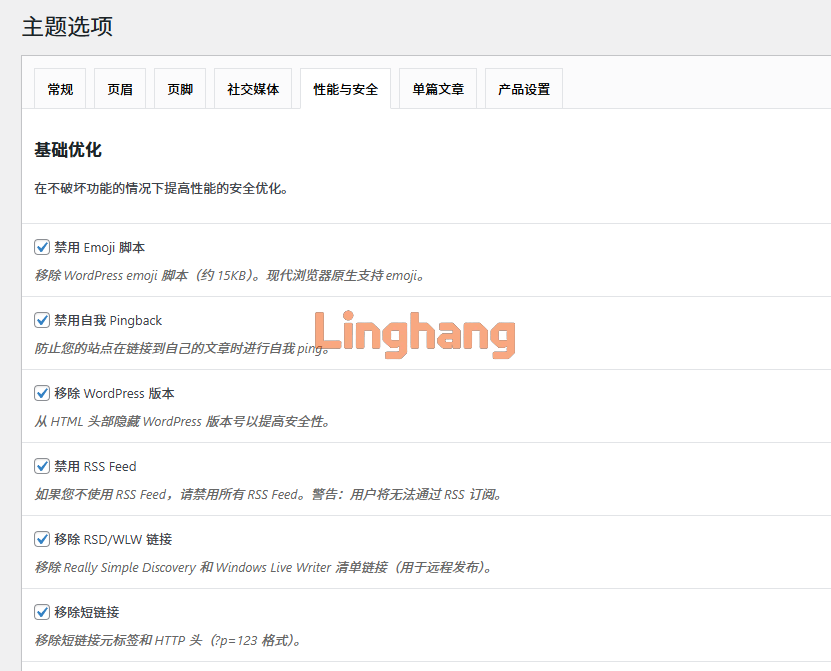
At the same time, the LingHang theme options include some optimization items that you can enable as needed.
In addition, you can also do the following optimizations to further improve the speed of the LingHang theme.
1. Install a caching plugin. Search for 'cache' in the backend, and any popular caching plugin that appears will work with similar speed. If you are using the Baota panel, you can also considerenabling Nginx fast_cgi cache。
2. Install an image optimization plugin. As mentioned earlier, this site uses the Converter for Media plugin. If you are using the Baota panel, this plugin requiresadditional configuration。
3. Enable a CDN service. CloudFlare is a free CDN provider; you can choose to use it or purchase a paid CDN plan.
Note: Only install one optimization plugin with the same functionality. Installing multiple may cause feature conflicts and actually slow down the site.
Content Strategy and Off-Site Promotion
Content is king. For good SEO optimization, continuously updating valuable content is very important. To have a steady stream of content updates, you need a content strategy. At this stage, you can use keyword tools to extract long-tail keywords related to your main keywords and then plan content.
However, for a corporate website, we suggest that in addition to using tools to mine keywords, you can also consider directly asking sales to provide article material. Every question customers ask your sales team during communication can be turned into a valuable article.
Off-site promotion, simply put, means building backlinks from high-quality websites within your industry, or leaving your website information on their sites. High-quality, highly relevant backlinks are ten thousand times better than spammy links. So, if you can't secure high-quality backlinks, you might as well skip link building altogether.
A relatively simple link building strategy is to contribute valuable articles on social media and relevant industry forums/communities, leaving your link naturally. Content with substance is generally less likely to be deleted or blocked by administrators.
SEO Optimization Summary
The essence of SEO is not about chasing tricks, but about providing value.
Please do not put the cart before the horse. Before agonizing over speed and details, first answer the fundamental question: Does my content truly provide answers for users? Does my website clearly convey this value?
There are no shortcuts. Make good use of the code and speed advantages brought by the LingHang theme, focus on creating high-quality content, and solidly perform every basic optimization. Time will naturally give you the best rankings.
Article Update Frequency Recommendations
If you have the ability to consistently produce valuable articles, we recommend maintaining a pace of 2-3 articles per week. When we were working on the "Naibabiji" website, we persisted with a frequency of 3 articles per day for about 3 months to boost traffic. Now, after 2 or 3 years with few updates, traffic and rankings have remained largely stable. So, SEO optimization seems quite simple—just keep updating daily. But it's also quite difficult. Writing valuable articles every day can give you a headache. However, with AI's help now, if you have the energy, you can let AI brainstorm content ideas, but write it yourself. Don't let AI write entirely. AI competes for search engine users. Do you think search engines will rank AI-generated content well?