
Preface: Why This Comparison?
In the WordPress website building community, the debate between "lightweight themes" and "page builders" has never stopped. One side says page builders are too bloated and slow down websites, while the other side says lightweight themes lack features and flexibility.
Rather than endless debate, let's run a real test.
As the developer of the LingHang theme, I could simply show the speed test results of my own theme. But I prefer to present areal, complete, and verifiablecomparison of data, allowing you to decide which solution best suits your needs.
Test Environment: A Real Server, Not an Ideal Environment
Many performance tests are conducted on "clean" test servers, but this is not a real-world scenario. Small and medium-sized enterprises often have limited server resources and need to run other websites and applications.
Server configuration for this test:
- Processor: 2-core Intel E5-2699 v4 (an old CPU from 2016)
- Memory: 2GB
- Server Management: Baota Panel
- Other applications on the same server: A running WooCommerce site
- Test site location: Two subdirectories under the same domain
💡Why choose such an environment?
This closely resembles the real situation for most small and medium-sized enterprises: limited budget, shared server resources, and multiple websites coexisting. Testing in such an environment yields more valuable results.
Tip:
1. Using a better-performing server will increase the test score;
2. Using a CDN (Content Delivery Network) will increase the test score (CDN was not enabled in this test);
3. Further targeted optimization by experienced users will increase the score. This test only performed optimizations that even beginners can do.
Comparison Plan: Ensuring Fairness
To make the comparison as fair as possible, I made the following settings:
Plan A: LingHang Theme
- Theme: LingHang Theme (Native Gutenberg Editor)
- Page Building Method: Using 15 built-in enterprise modules of the theme
- Additional Plugins: None (module functionality is built-in)
Plan B: Astra + Elementor
- Theme: Astra (Lightweight theme, officially recommended by Elementor)
- Page Builder: Elementor Free version
- Page Building Method: Using Elementor drag-and-drop editor
Common plugins installed for both plans:
- WP Super Cache (Page caching plugin)
- Rank Math SEO (SEO optimization plugin)
Test Pages:
Created under two subdirectories respectivelyHomepages with identical layout and structure, including:
- Homepage Carousel/Hero Section
- Company Introduction Text Paragraph
- 3-Column Service Display
- FAQ
- CTA Call-to-Action Slogan
- Latest Posts
Testing Tools and Methods
To comprehensively evaluate performance, I used two industry-recognized testing tools:
1. PageSpeed Insights
- URL:https://pagespeed.web.dev/
- Features: Google's official tool for evaluating Core Web Vitals
- Test Metrics: Performance, accessibility, best practices, and SEO for mobile and desktop
2. GTmetrix
- URL:https://gtmetrix.com/
- Features: Provides detailed waterfall charts and optimization suggestions
- Test Metrics: Load time, page size, number of requests, performance score
Testing Method:
- Test each page 3 times and take the average
- Clear all caches before testing
- Choose testing times during low server load periods (to avoid interference from other factors)
- Test location: Seattle, Washington, USA
Test Results Display
⚠️Results Explanation:
Test results are affected by various factors and may vary each time.
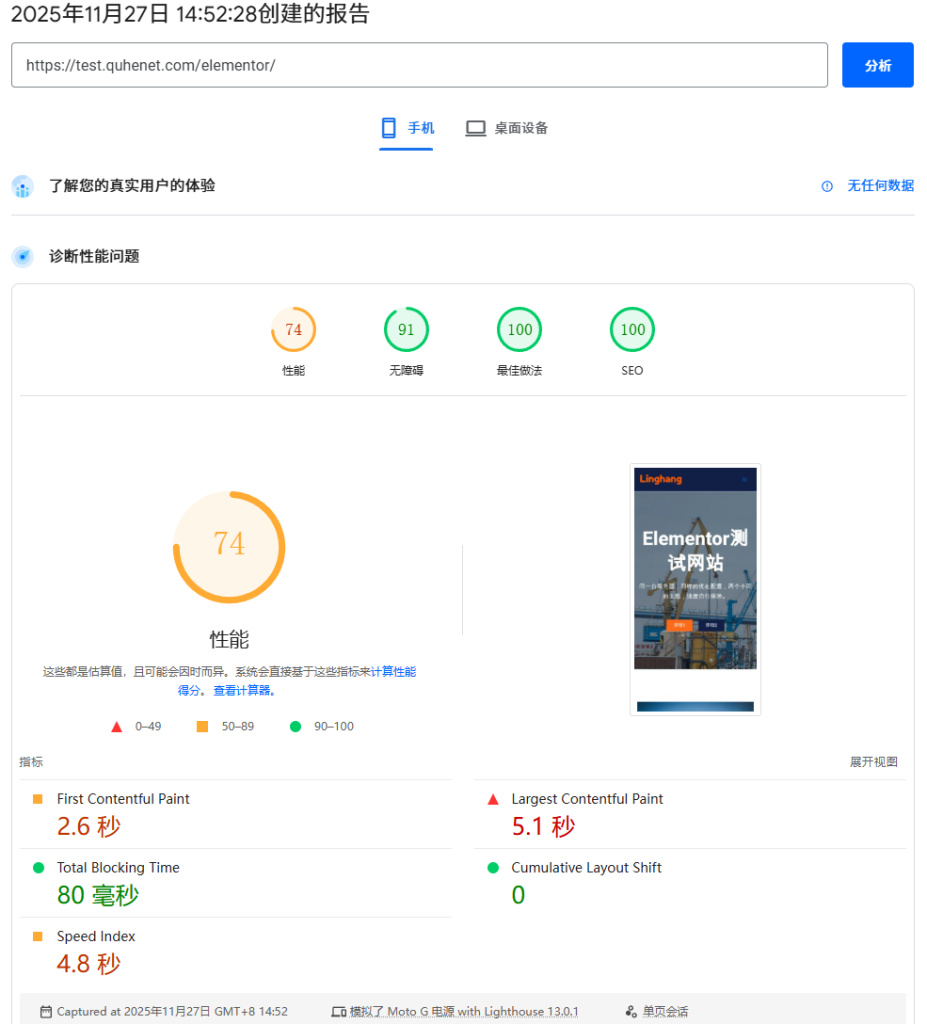
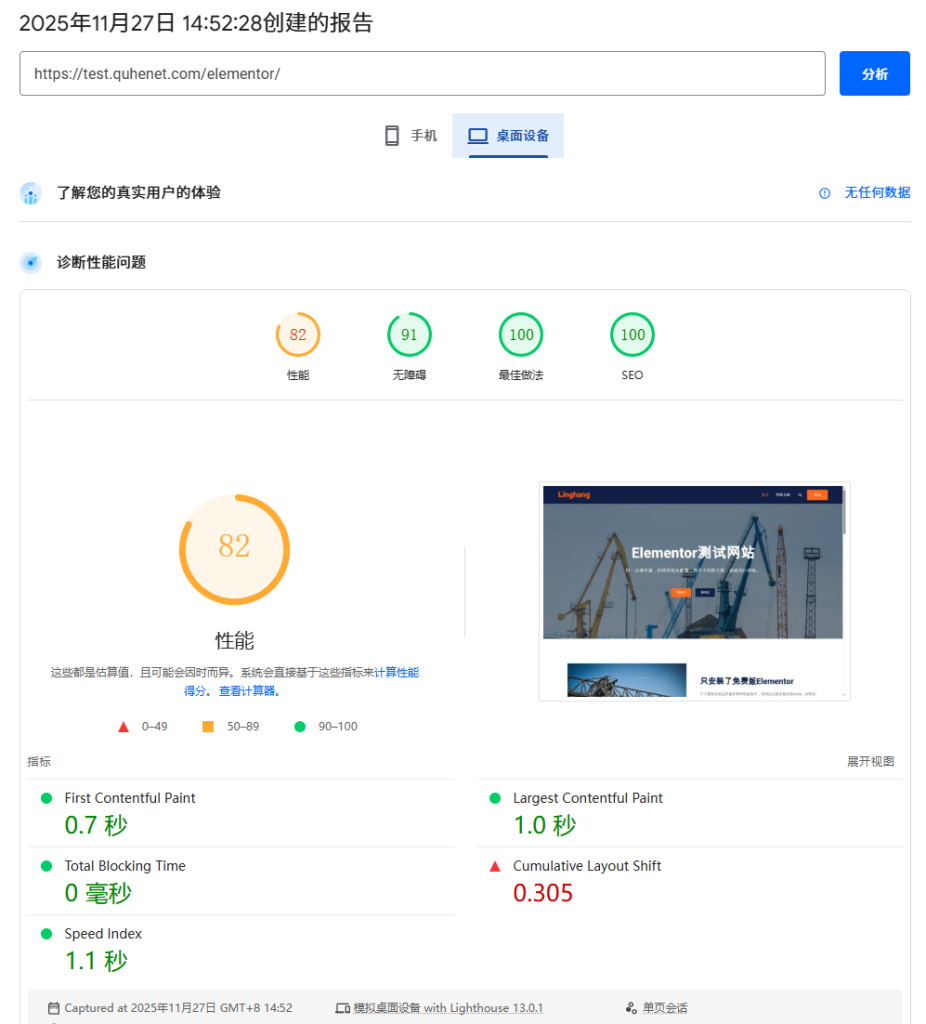
PageSpeed Insights Score Comparison
LingHang Theme:
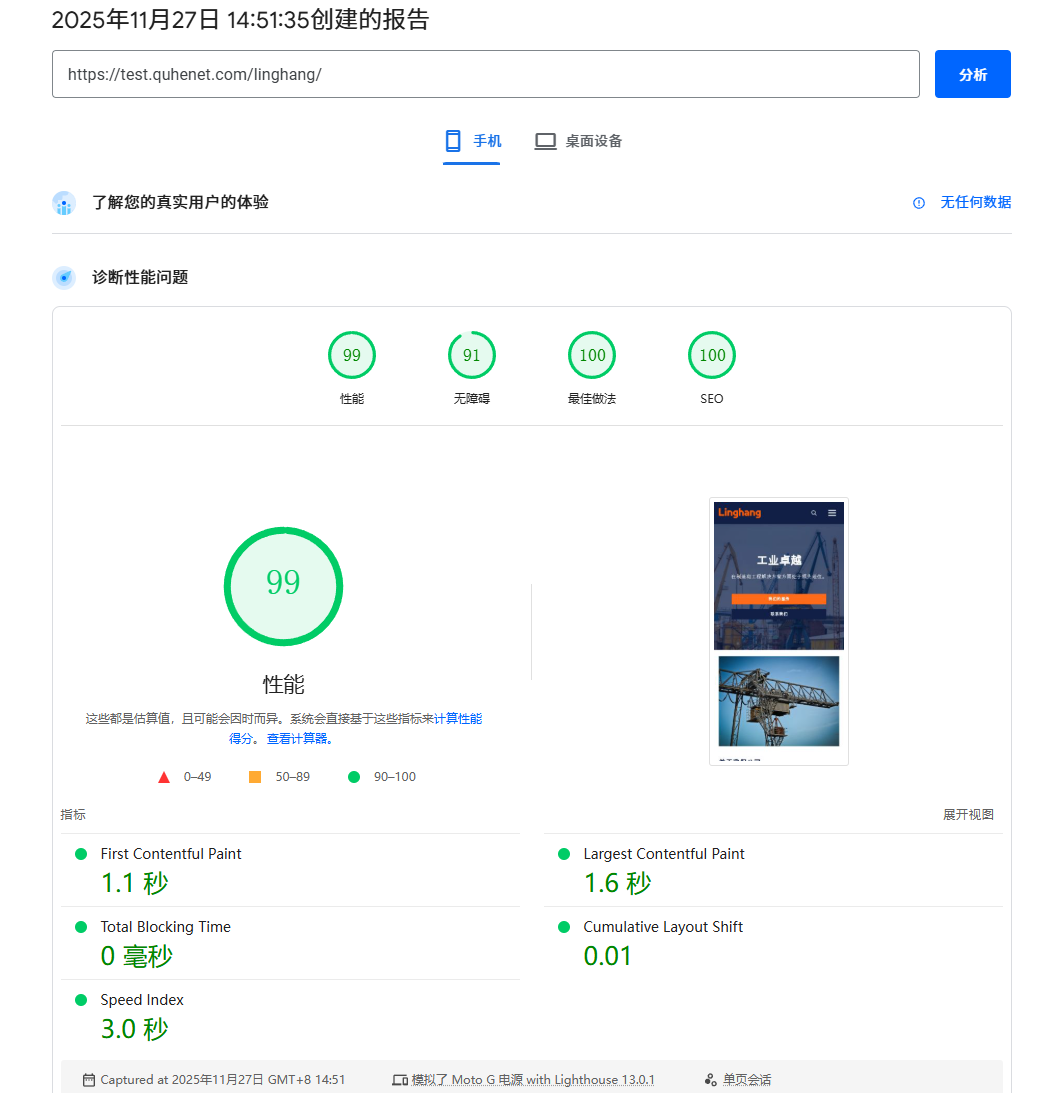
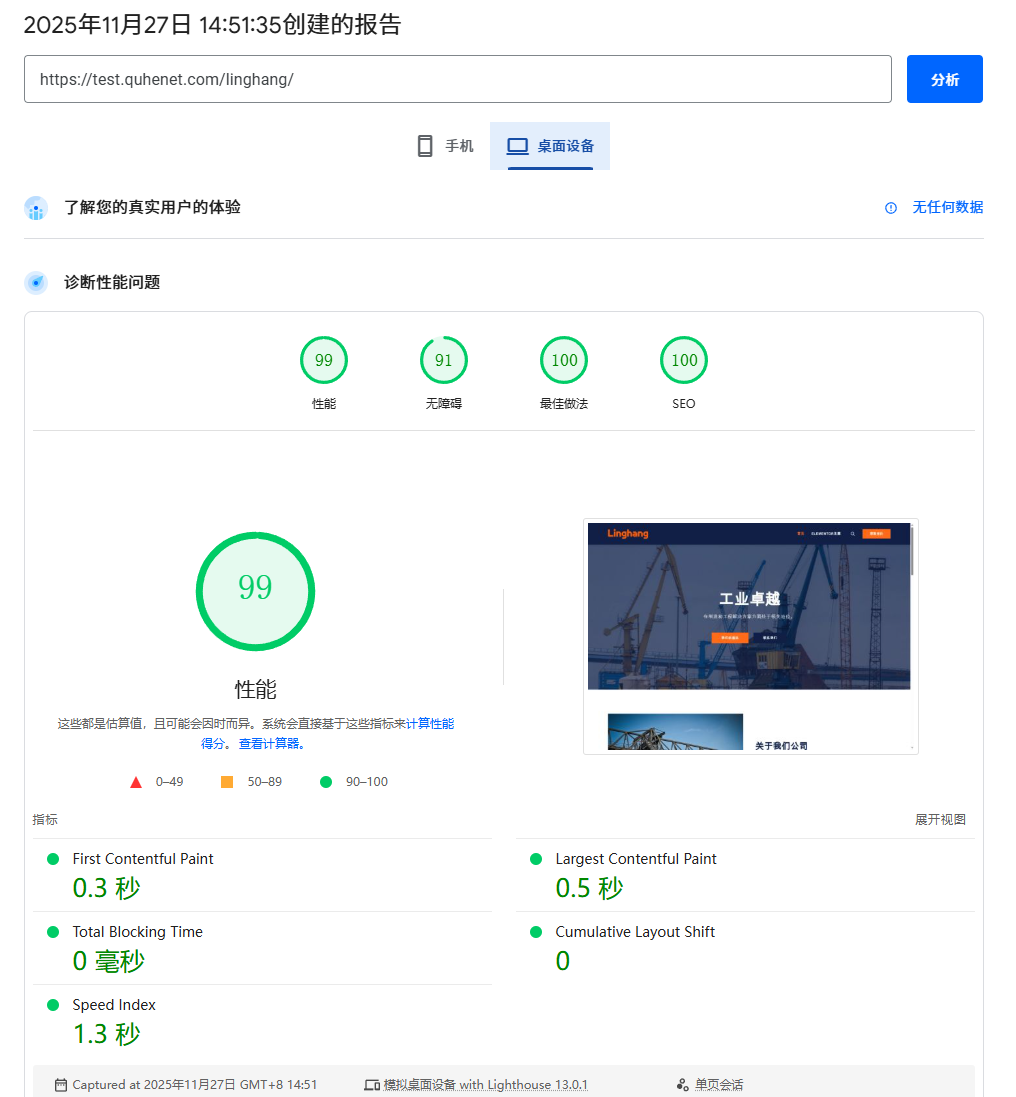
Astra + Elementor:
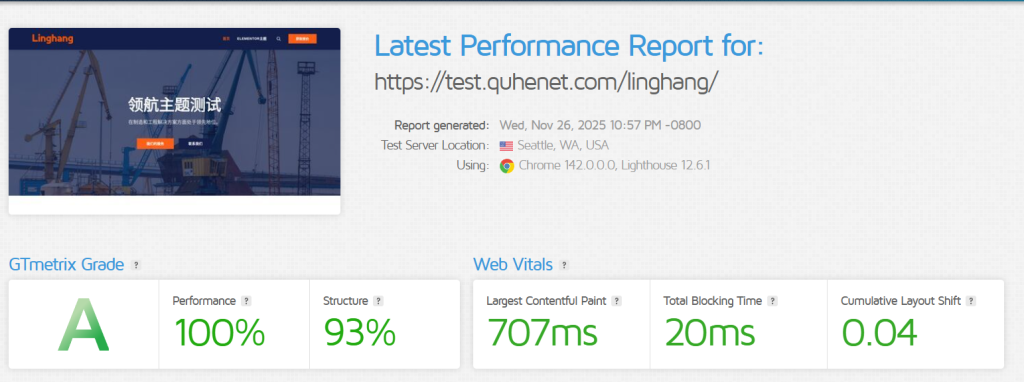
GTmetrix Performance Comparison
LingHang Theme:
Astra + Elementor:
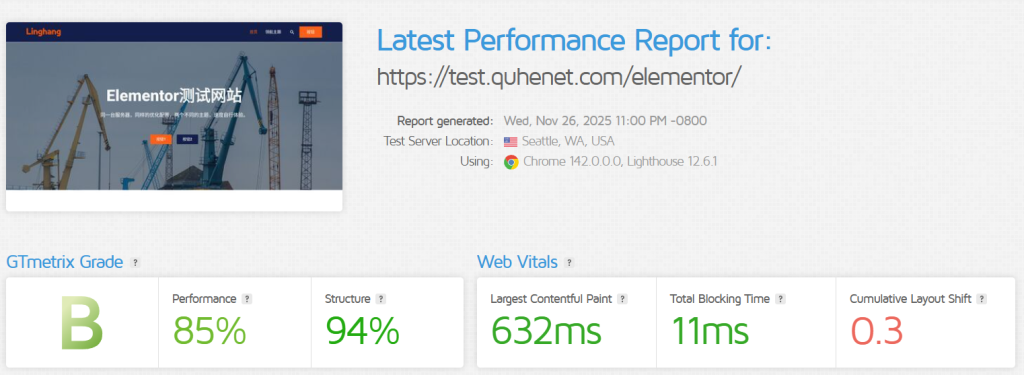
Results Analysis: Reasons Behind the Differences
Regardless of the test results, performance differences mainly come from the following aspects:
1. Code Architecture Differences
- LingHang Theme: Native Gutenberg blocks, WordPress core rendering, no additional JS frameworks
- Elementor: Independent front-end rendering system, requires loading Elementor-specific CSS and JS libraries
2. Resource Loading Differences
- LingHang Theme: Only loads module styles used on the current page
- Elementor: Need to load the complete page builder frontend resources (even in visitor mode)
3. Database Query Differences
- LingHang Theme: Content is stored in the standard WordPress post_content field
- Elementor: Content is stored in a JSON structure in the postmeta table, requiring additional parsing
4. Cache Efficiency Differences
- Both have WP Super Cache enabled, but the cache friendliness of dynamic content may differ
How to Choose: Scores Are Not the Only Criterion
After looking at the data, you might be thinking: "Which one should I choose?"
My advice is: Don't just look at the scores; look at the actual needs.
Reasons to Choose the LingHang Theme:
- ✅ You pursue ultimate loading speed
- ✅ You don't need overly complex page layouts
- ✅ You want a streamlined, easy-to-maintain website code
- ✅ Your server resources are limited
- ✅ You value SEO and want search engines to crawl content more easily
Reasons to Choose Astra + Elementor:
- ✅ You need highly customized page layouts
- ✅ You frequently need to adjust design details (margins, colors, animations, etc.)
- ✅ You have design experience and want full control over the visual effects
- ✅ Your server resources are sufficient to handle the extra performance overhead
- ✅ You are willing to sacrifice some speed for flexibility
💡The Most Important Criterion:
„Will users feel it“s slow when they actually open your website?„
- If the loading time is within 2 seconds, most users won't notice significant delay
- If the loading time exceeds 3 seconds, user churn rate will increase significantly
- Mobile users are more sensitive to speed, so mobile scores are more important
A website with a score of 90 but loading in 2 seconds is not much different from one with a score of 95 but loading in 1.5 seconds for users.
Test It Yourself: Don't Just Trust My Data
I strongly recommend testing with your own website (or the theme you plan to purchase):
The test site we builthttps://test.quhenet.com/You can run a test yourself by following the steps below. (The test site will not be kept permanently, so please test as soon as possible!)
Test Steps:
1. Use PageSpeed Insights
- Visit:https://pagespeed.web.dev/
- Enter your website URL
- Wait about 30 seconds, then check the mobile and desktop scores
- Focus on: LCP (Largest Contentful Paint) and CLS (Cumulative Layout Shift)
2. Use GTmetrix
- Visit:https://gtmetrix.com/
- Enter your website URL
- Select a test node (choose the node closest to your target users)
- Check the fully loaded time, page size, and number of requests
3. Real User Test (Most Important)
- Access your website using a mobile phone on a 4G network
- Time from clicking the link to seeing the complete page
- Ask 5 friends: "How fast does this website load?"
Comparison Test Suggestions:
If you want to do a comparison test like I did:
- Create two test sites on the same server
- Install different themes/solutions respectively
- Create pages with identical content
- Install the same essential plugins
- Enable caching on both before testing
- Record and compare the data
Final Thoughts: Performance Is Just One Part
For a website's success, performance is only one of many factors.
You also need to consider:
- Ease of Use: Can you easily update the content?
- Maintenance cost: How much time does each modification take?
- Scalability: Is it easy to add new features in the future?
- After-Sales Support: Can problems be resolved quickly?
- Total Cost of Ownership: Theme price + plugin costs + learning time + maintenance time
There is no perfect solution, only the one that best suits your needs.
If you are:
- A technical novice with a limited budget who needs to go live quickly→ A lightweight theme may be more suitable
- Have design requirements, are willing to invest learning time, and have good server performance→ A page builder may be more flexible