
FAQ
Common Concerns Before Purchase
Is this a new theme? Will you abandon it after I buy?
Rest assured, we won’t. Our tech blog "NaiBa WordPress Notes" has been online since April 13, 2019, and we remain dedicated to providing WordPress tutorials and services.
How can I be sure it works without customer cases?
This official site itself is the best proof. You can test its loading speed and explore every module firsthand. We also provide a detailed demo video for you to see it in action.
主题支持多语言吗?
支持,自行安装多语言插件即可。本站使用的是TranslatePress翻译插件免费版手工翻译(只翻译了首页),付费版可以自动翻译,也可以安装其他翻译插件。
Can I really get started in 3 minutes? I have no technical skills.
Yes! Designed specifically for non‑tech users:
- Everything is point‑and‑click, no code needed
- Every module comes with a tutorial
- 1‑on‑1 WeChat support—ask anytime you’re stuck
What happens after the 6-month support period?
Early bird users receive special terms:
- First 20 buyers: Lifetime VIP technical support (auto‑renewed for free)
- From the 21st buyer: Optional yearly renewal at ¥99/year after the first year
- The theme itself is yours for life—renewal is only for continued guidance.
Can I use it on multiple websites?
Each license is bound to the root domain of one website. It can be used on subdomains, but cannot be transferred to another domain.
Once bound, the license is non-transferable.
Will the theme be updated regularly?
Before feature finalization: Updates are based on user feedback.
After finalization: We’ll maintain security, fix bugs, and keep compatibility with the latest WordPress versions.
我可以修改哪些内容?
是不是以为买了领航主题就一定和演示站一模一样?
页眉我可以自己修改吗?
页眉,指的是页面顶上导航菜单这一条内容。

你可以修改以下内容:
- 页眉背景颜色(现在是深蓝色,你可以自己改为其他颜色)
- LOGO图片
- 导航菜单(菜单内容和菜单显示位置左,中,右)
- 菜单文本颜色
- 是否显示搜索图标
- 是否显示搜索图标后的按钮和按钮内容跟链接
我可以修改网站颜色吗?
可以。
你可以自己修改网站主颜色、辅助色和强调色。
页脚我可以修改哪些内容?
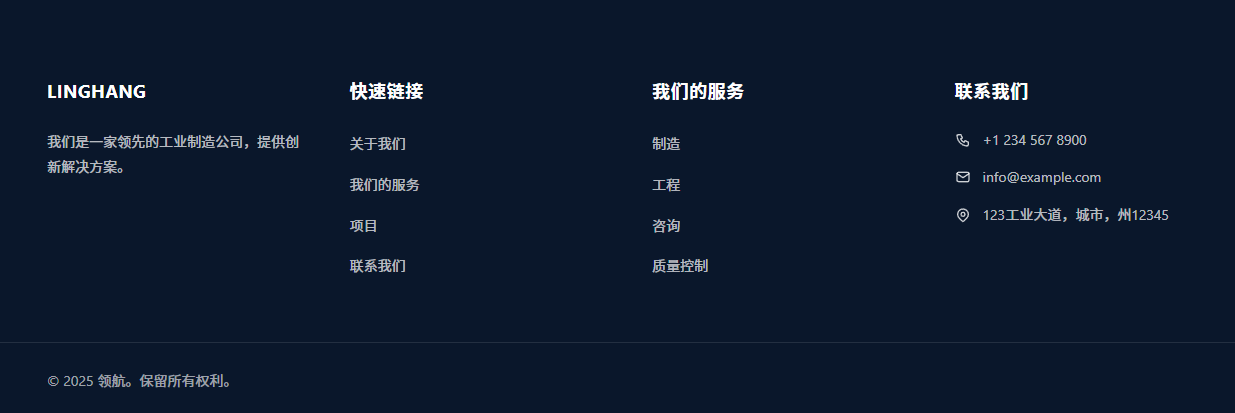
页脚部分你可以自行修改内容:
- 页脚LOGO图片
- 页脚介绍文案(我们是一家领先的工业制造公司,提供创新解决方案。)
- “快速链接”和“我们的服务”两个部分的标题跟链接
- 联系我们部分的电话、邮箱和地址信息
- 版权文本
- 版权文本右侧页脚菜单(截图未设置,参见本演示站页脚右侧“联系 | 常见问题”)
- 社交媒体账号
页面布局必须和演示站一样吗?
不。你可以自行设计页面布局。
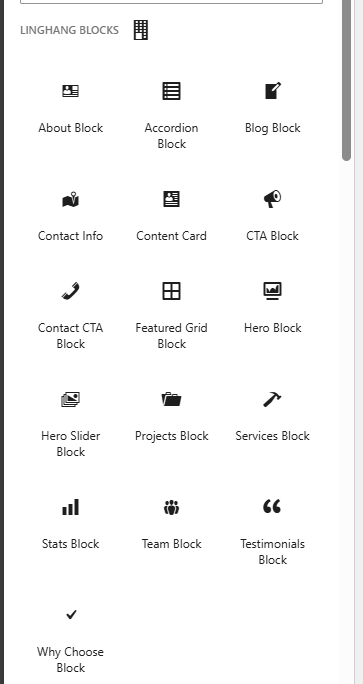
上面截图是领航主题预制的古腾堡块,你可以手动添加到网站页面后填写块的内容,从而自行组合网页布局排版。
除了主题自带的块,WordPress默认的块或者其他插件的块也可以使用。只要你有想法,可以随便你进行页面内容组合。